/* global React */
const { useState: useStateB } = React;

// ============ VARIANT B — Editorial, large typography, asymmetric ============

const B_INK = '#0b0b10';
const B_PAPER = '#f6f4ef';
const B_ACCENT = 'linear-gradient(135deg, #4f46e5 0%, #7c3aed 100%)';
const B_ACCENT_SOLID = '#4f46e5';

function VariantB() {
  return (
    <div style={bStyles.root}>
      <BNav />
      <BHero />
      <BTicker />
      <BFeaturesEditorial />
      <BAIDeepDive />
      <BCollectionsDeepDive />
      <BPrivacyDeepDive />
      <BForWhom />
      <BHowItWorks />
      <BPricing />
      <BFinalCTA />
      <BFooter />
    </div>
  );
}

function BNav() {
  return (
    <header style={bStyles.nav}>
      <div style={bStyles.navInner}>
        <a href="https://chromewebstore.google.com/detail/tab-manager-ai-%E2%80%94-smart-ta/cpmfimlgpampehokljfcfjcdoknmjpdn" target="_blank" rel="noopener" style={{...bStyles.logo, textDecoration: 'none'}}>
          <div style={bStyles.logoMark}>
            <span style={{fontSize: 18, fontWeight: 700, color: 'white'}}>#</span>
          </div>
          <div style={{display: 'flex', flexDirection: 'column', lineHeight: 1.05}}>
            <span style={{fontSize: 15, fontWeight: 700, color: B_INK, letterSpacing: '-0.01em'}}>Tab Manager AI</span>
            <span style={{fontSize: 10.5, color: '#6b6a60', letterSpacing: '0.08em', textTransform: 'uppercase'}}>Smart Tab Organizer</span>
          </div>
        </a>
        <nav style={bStyles.navLinks}>
          <a href="#features" style={bStyles.navLink}>Features</a>
          <a href="#how" style={bStyles.navLink}>How It Works</a>
          <a href="#pricing" style={bStyles.navLink}>Pricing</a>
          <a href="#contact" style={bStyles.navLink}>Contact</a>
        </nav>
        <a href="https://chromewebstore.google.com/detail/tab-manager-ai-%E2%80%94-smart-ta/cpmfimlgpampehokljfcfjcdoknmjpdn" target="_blank" rel="noopener" style={bStyles.navCta}>
          <ChromeIconB />
          Add to Chrome
        </a>
      </div>
    </header>
  );
}

function BHero() {
  return (
    <section style={bStyles.hero}>
      <div style={bStyles.heroGrid}>
        <div style={bStyles.heroLeft}>
          <div style={bStyles.heroMeta}>
            <span>Issue № 1.1.2</span>
            <span style={bStyles.heroDot} />
            <span>April 2026</span>
            <span style={bStyles.heroDot} />
            <span>For Chrome</span>
          </div>
          <h1 style={bStyles.heroH1}>
            Your Chrome tabs —<br/>
            <em style={bStyles.heroEm}>organized</em> by AI.
          </h1>
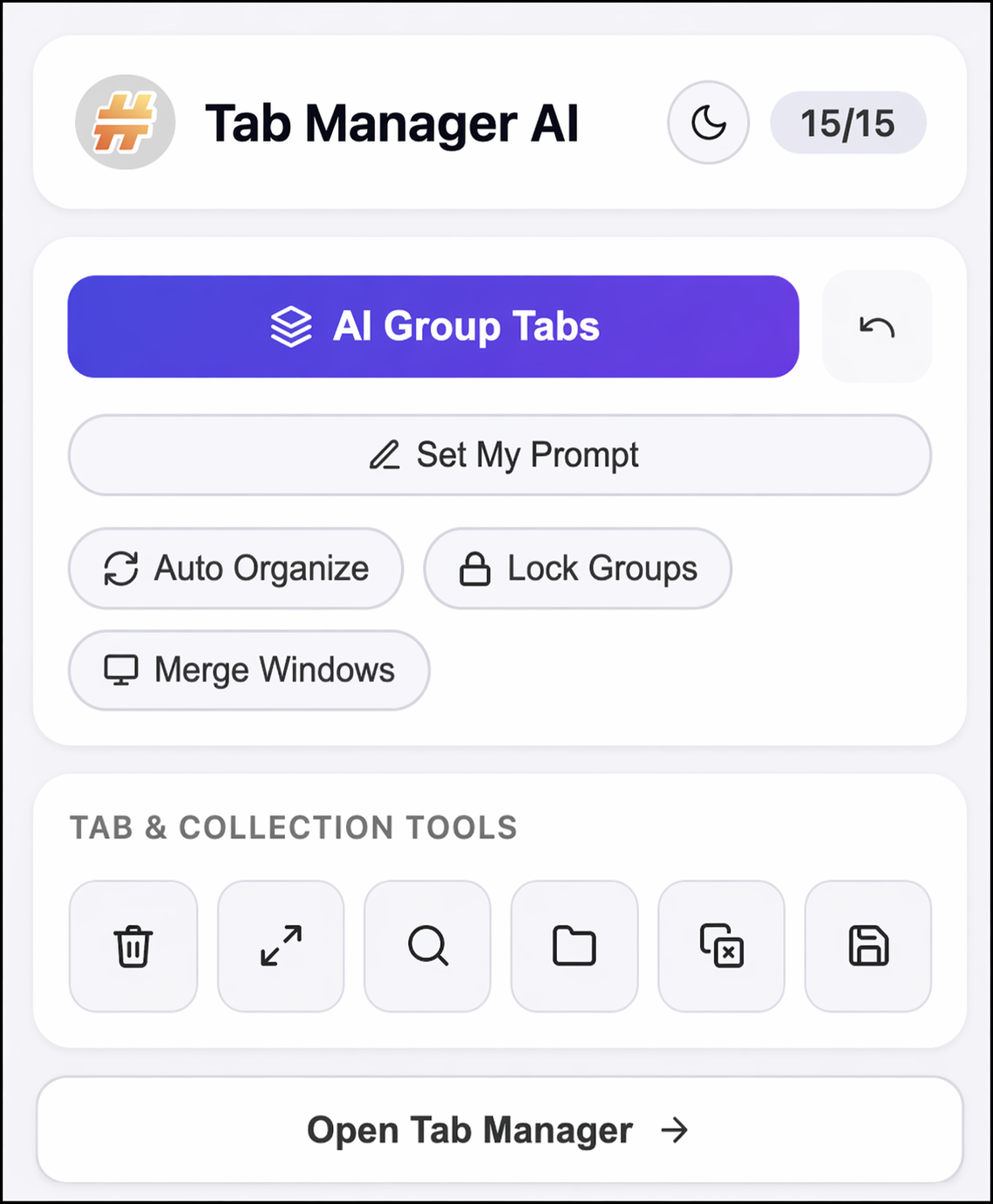
          <p style={bStyles.heroSub}>
            Tab Manager AI is a Chrome tab manager extension that reads your open tabs
            and groups them by domain, project, or topic — the way you describe.
            Save all open tabs, restore browser sessions, export anytime. No account required.
          </p>
          <div style={bStyles.heroCtas}>
            <a href="https://chromewebstore.google.com/detail/tab-manager-ai-%E2%80%94-smart-ta/cpmfimlgpampehokljfcfjcdoknmjpdn" target="_blank" rel="noopener" style={bStyles.ctaPrimary}>
              <ChromeIconB light />
              Add to Chrome — Free
            </a>
            <a href="#how" style={bStyles.ctaLink}>
              <span style={{textDecoration: 'underline', textUnderlineOffset: 4}}>See how it works</span>
              <span>↓</span>
            </a>
          </div>
          <div style={bStyles.heroStars}>
            <span style={bStyles.heroStarBadge}>
              <span style={bStyles.heroStarIcons}>★★★★★</span>
              <span style={bStyles.heroStarScore}>5.0</span>
            </span>
            <span style={bStyles.heroStarLabel}>Rated on Chrome Web Store</span>
          </div>
          <div style={bStyles.heroFactsRow}>
            <div style={bStyles.heroFact}>
              <div style={bStyles.heroFactBig}>0</div>
              <div style={bStyles.heroFactLabel}>accounts required</div>
            </div>
            <div style={bStyles.heroFact}>
              <div style={bStyles.heroFactBig}>15</div>
              <div style={bStyles.heroFactLabel}>free AI tab groupings / month</div>
            </div>
            <div style={bStyles.heroFact}>
              <div style={bStyles.heroFactBig}>4</div>
              <div style={bStyles.heroFactLabel}>formats to export Chrome tabs</div>
            </div>
          </div>
        </div>
        <div style={bStyles.heroRight}>
          <div style={bStyles.heroImgLabel}>
            <span style={bStyles.figureTag}>Fig. 01</span>
            <span>The browser action — Tab Manager AI popup</span>
          </div>
          <div style={bStyles.heroPopupCard}>
            <img src="assets/popup.png" alt="Tab Manager AI Chrome extension popup — AI tab organizer interface" style={{width: '100%', display: 'block'}} />
          </div>
        </div>
      </div>
    </section>
  );
}

function BTicker() {
  const items = [
    'No account',
    'Local storage',
    'AI-powered',
    'Drag & drop',
    'Undo / Redo',
    'Dark mode',
    'Export: JSON · CSV · MD · TXT',
    'Session restore',
    'Keyboard shortcuts',
    'Tags & comments',
    'Auto-deduplicate',
    'Pin collections',
  ];
  return (
    <div style={bStyles.ticker}>
      <div style={bStyles.tickerTrack}>
        {[...items, ...items].map((x, i) => (
          <span key={i} style={bStyles.tickerItem}>
            <span style={bStyles.tickerStar}>✱</span> {x}
          </span>
        ))}
      </div>
    </div>
  );
}

function BFeaturesEditorial() {
  const items = [
    { n: '01', t: 'AI Tab Grouping', d: 'One click. GPT-4o-mini sorts 100 open tabs by category, domain, or project. You tell it how.' },
    { n: '02', t: 'Unlimited Tab Collections', d: 'Tag, pin, drag. Reorder everything. No cap on how many tab collections you keep.' },
    { n: '03', t: 'Full History & Session Restore', d: 'Every action tracked. Ctrl+Z walks it back. Ctrl+Y puts it forward. Restore browser sessions in one click.' },
    { n: '04', t: 'Export Chrome Tabs — 4 Formats', d: 'JSON. CSV. Markdown. TXT. Backup chrome tabs or share them with a teammate.' },
    { n: '05', t: 'Privacy-First Tab Manager', d: 'Local storage only. No account. No tracking. AI sees only tab titles and URLs — never your content.' },
    { n: '06', t: 'Dark Mode & Shortcuts', d: 'Auto-detect dark mode. Resizable panels. Keyboard shortcuts for the things you do constantly.' },
  ];
  return (
    <section id="features" style={bStyles.features}>
      <div style={bStyles.sectionHeadLeft}>
        <div style={bStyles.eyebrow}><span style={bStyles.eyebrowBar}/> Features</div>
        <h2 style={bStyles.h2Big}>
          AI-Powered Chrome<br/>
          <em style={bStyles.accentEm}>Tab Manager</em><br/>
          Extension Features.
        </h2>
      </div>
      <div style={bStyles.featGrid}>
        {items.map((it, i) => (
          <article key={i} style={bStyles.featArticle}>
            <div style={bStyles.featRule} />
            <div style={bStyles.featNum}>{it.n}</div>
            <h3 style={bStyles.featTitle}>{it.t}</h3>
            <p style={bStyles.featDesc}>{it.d}</p>
          </article>
        ))}
      </div>
    </section>
  );
}

function BAIDeepDive() {
  const prompts = ['Group by domain', 'Separate work and entertainment', 'Group by project', 'Cluster by topic'];
  return (
    <section style={bStyles.ddSection}>
      <div style={bStyles.chapterMark}>Chapter I</div>
      <div style={bStyles.ddGrid}>
        <div style={bStyles.ddTextCol}>
          <h2 style={bStyles.ddH2}>
            How AI tab<br/>
            grouping works.
          </h2>
          <p style={bStyles.ddLead}>
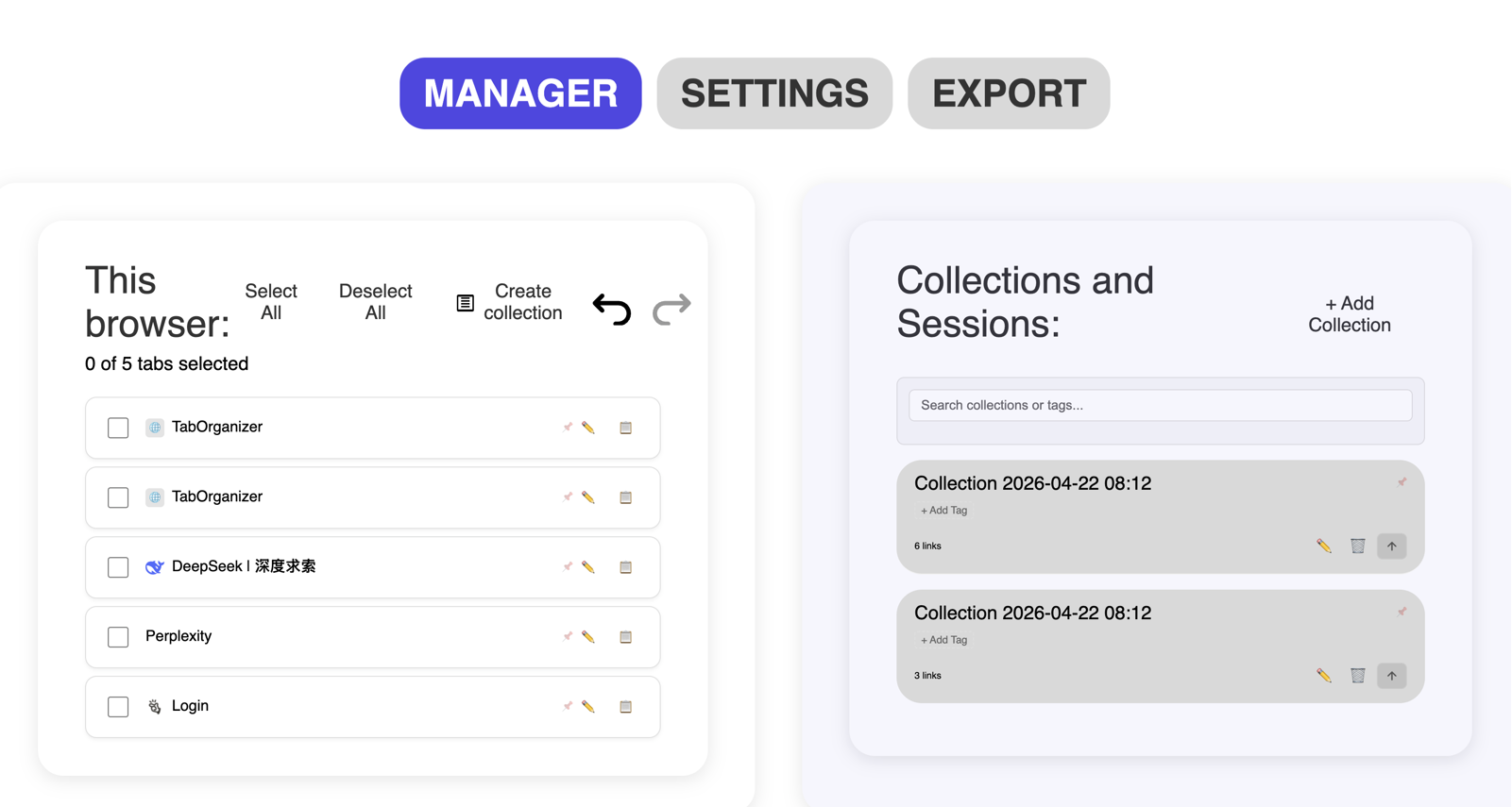
            Hit <b>AI Group Tabs</b>. The Chrome tab organizer reads your tab titles and URLs,
            then groups them exactly the way you describe. Nothing else leaves your browser.
          </p>
          <div style={bStyles.promptCard}>
            <div style={bStyles.promptCardHead}>
              <span style={bStyles.figureTag}>Prompts</span>
              <span style={{fontSize: 12.5, color: '#6b6a60'}}>Things you can type:</span>
            </div>
            <ul style={bStyles.promptList}>
              {prompts.map((p, i) => (
                <li key={i} style={bStyles.promptLine}>
                  <span style={bStyles.promptArrow}>→</span>
                  <span style={bStyles.promptText}>"{p}"</span>
                </li>
              ))}
            </ul>
          </div>
          <div style={bStyles.limitCallout}>
            <b style={{color: B_INK, fontSize: 15}}>15 free AI tab groupings / month.</b>{' '}
            <span style={{color: '#6b6a60'}}>Unlimited on Pro — $3 / mo.</span>
          </div>
        </div>
        <div style={bStyles.ddVisualCol}>
          <div style={bStyles.figureTag}>Fig. 02 — AI in action</div>
          <div style={bStyles.ddMockShell}>
            <img src="assets/popup.png" alt="AI tab organizer grouping Chrome tabs in one click" style={{width: '100%', display: 'block'}} />
          </div>
        </div>
      </div>
    </section>
  );
}

function BCollectionsDeepDive() {
  return (
    <section style={bStyles.ddSection}>
      <div style={bStyles.chapterMark}>Chapter II</div>
      <div style={{...bStyles.ddGrid, gridTemplateColumns: '1.2fr 1fr'}}>
        <div style={bStyles.ddVisualCol}>
          <div style={bStyles.figureTag}>Fig. 03 — Manager view</div>
          <div style={bStyles.ddMockShell}>
            <img src="assets/manager.png" alt="Tab Manager AI collections manager — save and restore browser sessions" style={{width: '100%', display: 'block'}} />
          </div>
        </div>
        <div style={bStyles.ddTextCol}>
          <h2 style={bStyles.ddH2}>
            Save all open tabs<br/>
            &amp; <em style={bStyles.accentEm}>restore</em> browser sessions.
          </h2>
          <p style={bStyles.ddLead}>
            Drag tabs between collections. Pin the ones you open daily.
            Tag and comment. Close the browser, open it tomorrow —
            every tab group and browser session is exactly where you left it.
          </p>
          <div style={bStyles.pairList}>
            {[
              ['Drag & drop', 'between collections'],
              ['Pin', 'collections you use daily'],
              ['Tags + comments', 'for retrieval'],
              ['Ctrl + Z / Y', 'undo any action, any time'],
              ['Session restore', 'one click, any device'],
            ].map(([k, v], i) => (
              <div key={i} style={bStyles.pairRow}>
                <div style={bStyles.pairK}>{k}</div>
                <div style={bStyles.pairV}>{v}</div>
              </div>
            ))}
          </div>
        </div>
      </div>
    </section>
  );
}

function BPrivacyDeepDive() {
  const formats = ['JSON', 'CSV', 'Markdown', 'TXT'];
  return (
    <section style={bStyles.ddSection}>
      <div style={bStyles.chapterMark}>Chapter III</div>
      <div style={bStyles.ddGrid}>
        <div style={bStyles.ddTextCol}>
          <h2 style={bStyles.ddH2}>
            Export &amp; backup<br/>
            your <em style={bStyles.accentEm}>Chrome tabs</em> — safely.
          </h2>
          <p style={bStyles.ddLead}>
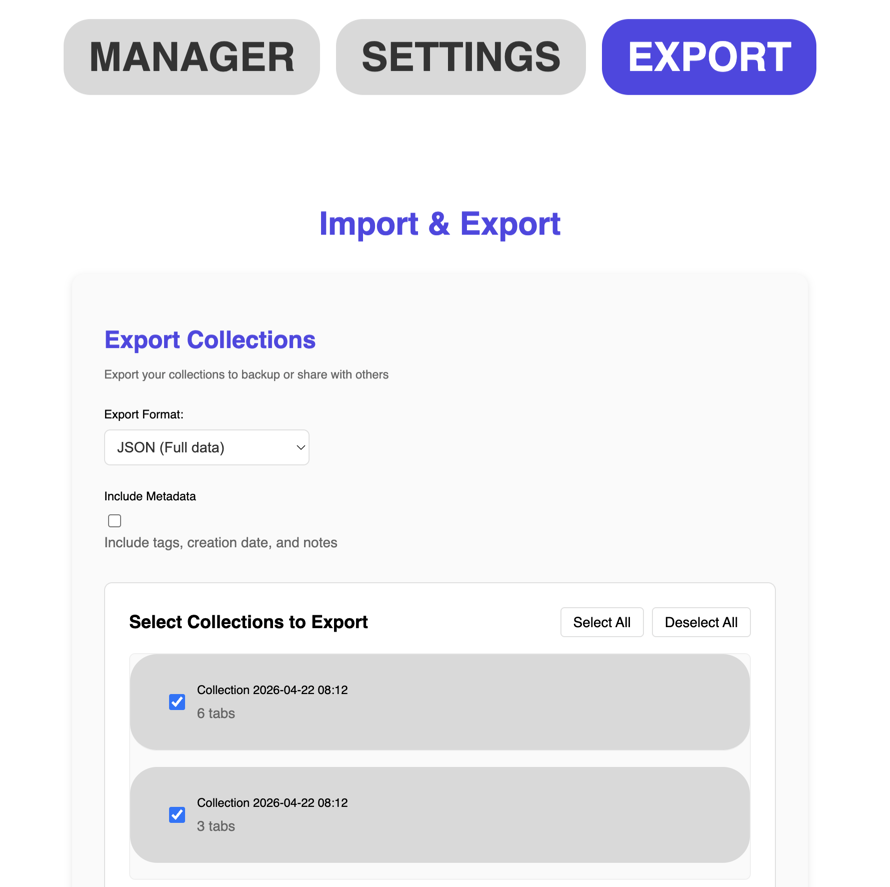
            Every collection lives in your browser's local storage — not on our servers.
            The AI sees only tab titles and URLs, only when you press the button.
            Export and backup your Chrome tabs to any format whenever you need.
          </p>
          <div style={bStyles.formatsRow}>
            {formats.map((f, i) => (
              <div key={i} style={bStyles.formatBox}>
                <span style={bStyles.formatBoxN}>0{i+1}</span>
                <span style={bStyles.formatBoxLabel}>.{f}</span>
              </div>
            ))}
          </div>
          <ul style={bStyles.checklist}>
            <li><span style={bStyles.checkmark}>✓</span> Local storage — not on our servers</li>
            <li><span style={bStyles.checkmark}>✓</span> No account required</li>
            <li><span style={bStyles.checkmark}>✓</span> No analytics, no tracking</li>
            <li><span style={bStyles.checkmark}>✓</span> Import/export on any device</li>
          </ul>
        </div>
        <div style={bStyles.ddVisualCol}>
          <div style={bStyles.figureTag}>Fig. 04 — Export</div>
          <div style={bStyles.ddMockShell}>
            <img src="assets/export.png" alt="Export Chrome tabs in JSON, CSV, Markdown, TXT formats" style={{width: '100%', display: 'block'}} />
          </div>
        </div>
      </div>
    </section>
  );
}

function BForWhom() {
  const segs = [
    { t: 'The Power User', line: 'Runs 100+ tabs. Keeps separate collections for every rabbit hole.' },
    { t: 'The Professional', line: 'Client projects live in their own collections. Reports export. Sessions restore.' },
    { t: 'The Student', line: 'Subject folders, Markdown reading lists, study sessions that follow them across devices.' },
    { t: 'Everyone Else', line: 'Closes tabs without losing them. Lighter browser, less noise, faster finding.' },
  ];
  return (
    <section style={bStyles.forWhom}>
      <div style={bStyles.sectionHeadLeft}>
        <div style={bStyles.eyebrow}><span style={bStyles.eyebrowBar}/> Reader Profiles</div>
        <h2 style={bStyles.h2Big}>
          Who uses this<br/>
          <em style={bStyles.accentEm}>Chrome tab organizer?</em>
        </h2>
      </div>
      <div style={bStyles.profileList}>
        {segs.map((s, i) => (
          <div key={i} style={bStyles.profileRow}>
            <div style={bStyles.profileNum}>{String(i + 1).padStart(2, '0')}</div>
            <div style={bStyles.profileName}>{s.t}</div>
            <div style={bStyles.profileLine}>{s.line}</div>
          </div>
        ))}
      </div>
    </section>
  );
}

function BHowItWorks() {
  const steps = [
    { t: 'Install', d: 'Add the chrome tab manager extension from the Web Store — one click, no account.' },
    { t: 'Organize', d: 'Press AI Group Tabs or drag & drop open tabs into collections yourself.' },
    { t: 'Save', d: 'Save all open tabs, backup chrome tabs, or export across devices in 4 formats.' },
    { t: 'Restore', d: 'Restore previous browser sessions in one click — every tab group preserved.' },
  ];
  return (
    <section id="how" style={bStyles.how}>
      <div style={bStyles.sectionHeadLeft}>
        <div style={bStyles.eyebrow}><span style={bStyles.eyebrowBar}/> How It Works</div>
        <h2 style={bStyles.h2Big}>
          How to set up your<br/>
          <em style={bStyles.accentEm}>AI tab organizer</em> in Chrome.
        </h2>
      </div>
      <div style={bStyles.howGrid}>
        {steps.map((s, i) => (
          <div key={i} style={bStyles.howStep}>
            <div style={bStyles.howTopRule} />
            <div style={bStyles.howNum}>Step {String(i + 1).padStart(2, '0')}</div>
            <div style={bStyles.howTitle}>{s.t}</div>
            <div style={bStyles.howDesc}>{s.d}</div>
          </div>
        ))}
      </div>
    </section>
  );
}

function BPricing() {
  const [yearly, setYearly] = useStateB(false);
  const [open, setOpen] = useStateB(0);
  const faqs = [
    { q: 'Do I need a credit card for the Free plan?', a: 'No. Install the extension and start organizing — no account, no card, no email.' },
    { q: 'What happens after the 7-day Pro trial?', a: 'You confirm to continue, or fall back to Free automatically. Your collections stay.' },
    { q: 'Is my data safe when AI runs?', a: 'AI grouping sends only tab titles and URLs for categorization — nothing else. No browsing history, no personal data.' },
    { q: 'Can I cancel any time?', a: 'Yes. One click. You keep Pro through the end of the billing cycle.' },
  ];
  return (
    <section id="pricing" style={bStyles.pricing}>
      <div style={bStyles.sectionHeadLeft}>
        <div style={bStyles.eyebrow}><span style={bStyles.eyebrowBar}/> Pricing</div>
        <h2 style={bStyles.h2Big}>
          Free Chrome tab manager.<br/>
          <em style={bStyles.accentEm}>Pro</em> when you need more AI.
        </h2>
      </div>
      <div style={bStyles.toggleWrap}>
        <button
          onClick={() => setYearly(false)}
          style={{...bStyles.toggleBtn, ...(yearly ? {} : bStyles.toggleActive)}}
        >Monthly</button>
        <button
          onClick={() => setYearly(true)}
          style={{...bStyles.toggleBtn, ...(yearly ? bStyles.toggleActive : {})}}
        >Yearly <span style={bStyles.saveTag}>Save 3%</span></button>
      </div>
      <div style={bStyles.priceGrid}>
        <div style={bStyles.priceCard}>
          <div style={bStyles.planName}>Free</div>
          <div style={bStyles.priceRow}>
            <span style={bStyles.priceBig}>$0</span>
            <span style={bStyles.pricePer}>free of charge</span>
          </div>
          <div style={bStyles.planNote}>Everything to get started.</div>
          <ul style={bStyles.priceList}>
            <li><BCheck/> All organization methods</li>
            <li><BCheck/> All tab management tools</li>
            <li><BCheck/><b>&nbsp;15 AI groupings / month</b></li>
            <li><BCheck/> Unlimited collections</li>
            <li><BCheck/> Export to 4 formats</li>
            <li><BCheck/> Full history & undo/redo</li>
          </ul>
          <a href="https://chromewebstore.google.com/detail/tab-manager-ai-%E2%80%94-smart-ta/cpmfimlgpampehokljfcfjcdoknmjpdn" target="_blank" rel="noopener" style={bStyles.ctaGhost}>Get Started Free</a>
        </div>
        <div style={bStyles.priceCardPro}>
          <div style={bStyles.proBadge}>7 days free trial</div>
          <div style={bStyles.planNameLight}>Pro</div>
          <div style={bStyles.priceRow}>
            <span style={{...bStyles.priceBig, color: 'white'}}>${yearly ? '2.92' : '3.00'}</span>
            <span style={{...bStyles.pricePer, color: 'rgba(255,255,255,0.7)'}}>/ month</span>
          </div>
          <div style={{...bStyles.planNote, color: 'rgba(255,255,255,0.6)'}}>
            {yearly ? 'Billed $35.00 yearly' : 'Billed monthly, cancel any time'}
          </div>
          <ul style={{...bStyles.priceList, color: 'rgba(255,255,255,0.85)'}}>
            <li><BCheckProBlink/> Everything in Free</li>
            <li><BCheckProBlink/><b>&nbsp;Unlimited AI groupings</b></li>
            <li><BCheckProBlink/> Priority support</li>
            <li><BCheckProBlink/> Early access to new features</li>
            <li><BCheckProBlink/> Custom AI commands (unlimited)</li>
          </ul>
          <a href="https://chromewebstore.google.com/detail/tab-manager-ai-%E2%80%94-smart-ta/cpmfimlgpampehokljfcfjcdoknmjpdn" target="_blank" rel="noopener" style={bStyles.ctaFilledWhite}>Start Free Trial</a>
        </div>
      </div>
      <div style={bStyles.faq}>
        <div style={bStyles.faqTitle}>Frequently asked</div>
        {faqs.map((f, i) => (
          <div key={i} style={bStyles.faqRow}>
            <button
              onClick={() => setOpen(open === i ? -1 : i)}
              style={bStyles.faqQ}
            >
              <span style={{display: 'flex', gap: 16, alignItems: 'baseline'}}>
                <span style={bStyles.faqN}>Q.{String(i+1).padStart(2, '0')}</span>
                <span>{f.q}</span>
              </span>
              <span style={{
                transform: open === i ? 'rotate(45deg)' : 'none',
                transition: 'transform .2s', fontSize: 22, color: '#6b6a60',
              }}>+</span>
            </button>
            {open === i && <div style={bStyles.faqA}>{f.a}</div>}
          </div>
        ))}
      </div>
    </section>
  );
}

function BFinalCTA() {
  return (
    <section style={bStyles.finalCta}>
      <div style={bStyles.finalMesh} />
      <div style={bStyles.finalInner}>
        <div style={bStyles.finalEyebrow}>Last page</div>
        <h2 style={bStyles.finalH2}>
          The best Chrome tab<br/>
          organizer. Free.
        </h2>
        <p style={bStyles.finalSub}>
          Install the AI tab manager extension and organize all open tabs in thirty seconds. Free forever.
        </p>
        <a href="https://chromewebstore.google.com/detail/tab-manager-ai-%E2%80%94-smart-ta/cpmfimlgpampehokljfcfjcdoknmjpdn" target="_blank" rel="noopener" style={bStyles.finalCtaBtn}>
          <ChromeIconB light />
          Add to Chrome — It's Free
          <span style={{marginLeft: 6}}>→</span>
        </a>
      </div>
    </section>
  );
}

function BFooter() {
  return (
    <footer id="contact" style={bStyles.footer}>
      <div style={bStyles.footerInner}>
        <div style={bStyles.footerCol}>
          <div style={bStyles.logo}>
            <div style={bStyles.logoMark}>
              <span style={{fontSize: 16, fontWeight: 700, color: 'white'}}>#</span>
            </div>
            <div style={{display: 'flex', flexDirection: 'column', lineHeight: 1.05}}>
              <span style={{fontSize: 14, fontWeight: 700, color: B_INK}}>Tab Manager AI</span>
              <span style={{fontSize: 10, color: '#6b6a60', letterSpacing: '0.08em', textTransform: 'uppercase'}}>Smart Tab Organizer</span>
            </div>
          </div>
          <div style={{marginTop: 16, fontSize: 13, color: '#6b6a60', maxWidth: 260}}>
            Published by one developer. Read by people with too many tabs.
          </div>
        </div>
        <div style={bStyles.footerCol}>
          <div style={bStyles.footerH}>Product</div>
          <a href="#features" style={bStyles.footerLink}>Features</a>
          <a href="#pricing" style={bStyles.footerLink}>Pricing</a>
          <a href="#how" style={bStyles.footerLink}>How it works</a>
        </div>
        <div style={bStyles.footerCol}>
          <div style={bStyles.footerH}>Support</div>
          <a href="mailto:smmfedorova@gmail.com" style={bStyles.footerLink}>Email</a>
          <a href="https://chromewebstore.google.com/detail/tab-manager-ai-%E2%80%94-smart-ta/cpmfimlgpampehokljfcfjcdoknmjpdn" target="_blank" rel="noopener" style={bStyles.footerLink}>Rate on Chrome Web Store</a>
        </div>
        <div style={bStyles.footerCol}>
          <div style={bStyles.footerH}>Legal</div>
          <a href="legal/terms.html" style={bStyles.footerLink}>Terms of Service</a>
          <a href="legal/privacy.html" style={bStyles.footerLink}>Privacy Policy</a>
          <a href="legal/refund.html" style={bStyles.footerLink}>Refund Policy</a>
        </div>
      </div>
      <div style={bStyles.footerBottom}>
        <span>© 2026 Tab Manager AI · Made with care</span>
        <span>Issue № 1.1.2</span>
      </div>
    </footer>
  );
}

// Icons
function ChromeIconB({ light }) {
  const c = light ? '#fff' : B_INK;
  return (
    <svg width="16" height="16" viewBox="0 0 24 24" fill="none" aria-hidden>
      <circle cx="12" cy="12" r="10" stroke={c} strokeWidth="1.8"/>
      <circle cx="12" cy="12" r="4" stroke={c} strokeWidth="1.8"/>
      <path d="M12 2 L12 8 M21 8 L13.5 10 M3 16 L10.5 13" stroke={c} strokeWidth="1.8" strokeLinecap="round"/>
    </svg>
  );
}
function BCheck() {
  return (
    <svg width="14" height="14" viewBox="0 0 24 24" style={{flexShrink: 0, marginRight: 10}}>
      <path d="M4 12 L10 18 L20 6" stroke={B_INK} strokeWidth="2.4" fill="none" strokeLinecap="round" strokeLinejoin="round"/>
    </svg>
  );
}
function BCheckProBlink() {
  return (
    <svg width="14" height="14" viewBox="0 0 24 24" style={{flexShrink: 0, marginRight: 10}}>
      <path d="M4 12 L10 18 L20 6" stroke="#fff" strokeWidth="2.4" fill="none" strokeLinecap="round" strokeLinejoin="round"/>
    </svg>
  );
}

const bStyles = {
  root: {
    fontFamily: "'Instrument Sans', 'Geist', -apple-system, sans-serif",
    color: B_INK, background: B_PAPER, fontSize: 16, lineHeight: 1.55,
  },
  nav: {
    position: 'sticky', top: 0, zIndex: 50,
    background: 'rgba(246, 244, 239, 0.82)', backdropFilter: 'blur(12px)',
    borderBottom: '1px solid rgba(11, 11, 16, 0.08)',
  },
  navInner: {
    maxWidth: 1320, margin: '0 auto', padding: '18px 48px',
    display: 'flex', alignItems: 'center', justifyContent: 'space-between', gap: 24,
  },
  logo: { display: 'flex', alignItems: 'center', gap: 10 },
  logoMark: {
    width: 32, height: 32, borderRadius: 10, display: 'grid', placeItems: 'center',
    background: B_ACCENT,
    boxShadow: '0 6px 16px -6px rgba(79, 70, 229, 0.5)',
  },
  navLinks: { display: 'flex', gap: 32 },
  navLink: { color: B_INK, fontSize: 14, textDecoration: 'none', fontWeight: 500, borderBottom: '1px solid transparent' },
  navCta: {
    display: 'inline-flex', alignItems: 'center', gap: 8,
    background: B_INK, color: 'white',
    padding: '11px 20px', borderRadius: 999, fontSize: 13.5, fontWeight: 600,
    textDecoration: 'none',
  },

  hero: { borderBottom: `1px solid rgba(11, 11, 16, 0.1)` },
  heroGrid: {
    maxWidth: 1320, margin: '0 auto', padding: '64px 48px 96px',
    display: 'grid', gridTemplateColumns: '1.5fr 1fr', gap: 80, alignItems: 'flex-start',
  },
  heroLeft: { },
  heroMeta: {
    display: 'flex', alignItems: 'center', gap: 12,
    fontFamily: "'JetBrains Mono', ui-monospace, monospace",
    fontSize: 12, color: '#6b6a60', textTransform: 'uppercase', letterSpacing: '0.12em',
  },
  heroDot: { width: 4, height: 4, borderRadius: 999, background: '#6b6a60' },
  heroH1: {
    margin: '24px 0 0',
    fontFamily: "'Instrument Serif', serif",
    fontSize: 128, lineHeight: 0.92, letterSpacing: '-0.045em', fontWeight: 400,
  },
  heroEm: {
    fontStyle: 'italic',
    background: B_ACCENT, WebkitBackgroundClip: 'text', backgroundClip: 'text', color: 'transparent',
  },
  heroSub: { marginTop: 32, fontSize: 21, color: '#3a3a3a', maxWidth: 560, lineHeight: 1.5 },
  heroCtas: { marginTop: 40, display: 'flex', gap: 24, alignItems: 'center', flexWrap: 'wrap' },
  ctaPrimary: {
    display: 'inline-flex', alignItems: 'center', gap: 10,
    background: B_INK, color: 'white',
    padding: '16px 26px', borderRadius: 999, fontSize: 15, fontWeight: 600, textDecoration: 'none',
  },
  ctaLink: {
    display: 'inline-flex', alignItems: 'center', gap: 8,
    color: B_INK, fontSize: 15, fontWeight: 500, textDecoration: 'none',
  },
  heroStars: {
    marginTop: 20, display: 'flex', alignItems: 'center', gap: 12,
  },
  heroStarBadge: {
    display: 'inline-flex', alignItems: 'center', gap: 7,
    background: 'white', border: '1px solid rgba(11,11,16,0.1)',
    borderRadius: 999, padding: '6px 14px',
    boxShadow: '0 2px 8px -2px rgba(11,11,16,0.1)',
  },
  heroStarIcons: {
    color: '#f59e0b', fontSize: 15, letterSpacing: 1,
  },
  heroStarScore: {
    fontFamily: "'JetBrains Mono', ui-monospace, monospace",
    fontSize: 13, fontWeight: 600, color: B_INK,
  },
  heroStarLabel: {
    fontSize: 13, color: '#6b6a60',
    fontFamily: "'JetBrains Mono', ui-monospace, monospace",
    letterSpacing: '0.04em',
  },
  heroFactsRow: {
    marginTop: 64, display: 'flex', gap: 48, borderTop: '1px solid rgba(11,11,16,0.1)', paddingTop: 24,
  },
  heroFact: {},
  heroFactBig: {
    fontFamily: "'Instrument Serif', serif", fontSize: 48, lineHeight: 1,
    letterSpacing: '-0.03em',
    background: B_ACCENT, WebkitBackgroundClip: 'text', backgroundClip: 'text', color: 'transparent',
  },
  heroFactLabel: { marginTop: 4, fontSize: 12, color: '#6b6a60', textTransform: 'uppercase', letterSpacing: '0.08em' },

  heroRight: { position: 'sticky', top: 100 },
  heroImgLabel: {
    display: 'flex', gap: 10, alignItems: 'center',
    fontSize: 12, color: '#6b6a60', marginBottom: 12,
    fontFamily: "'JetBrains Mono', ui-monospace, monospace",
  },
  figureTag: {
    fontSize: 11, padding: '3px 8px', borderRadius: 4,
    background: B_INK, color: B_PAPER,
    fontFamily: "'JetBrains Mono', ui-monospace, monospace",
    letterSpacing: '0.08em', textTransform: 'uppercase',
  },
  heroPopupCard: {
    borderRadius: 20, overflow: 'hidden',
    background: 'white',
    boxShadow: '0 30px 60px -20px rgba(11, 11, 16, 0.25)',
    border: '1px solid rgba(11,11,16,0.08)',
    transform: 'rotate(1.5deg)',
  },

  ticker: {
    borderTop: '1px solid rgba(11,11,16,0.1)', borderBottom: '1px solid rgba(11,11,16,0.1)',
    overflow: 'hidden', background: B_INK, color: B_PAPER,
  },
  tickerTrack: {
    display: 'flex', gap: 32, padding: '18px 0', whiteSpace: 'nowrap',
    animation: 'tickB 60s linear infinite',
  },
  tickerItem: {
    display: 'inline-flex', alignItems: 'center', gap: 10,
    fontSize: 14, letterSpacing: '0.04em', textTransform: 'uppercase',
    fontFamily: "'JetBrains Mono', ui-monospace, monospace", flexShrink: 0,
  },
  tickerStar: { color: '#a78bfa', fontSize: 16 },

  sectionHeadLeft: {
    maxWidth: 1320, margin: '0 auto', padding: '120px 48px 56px',
  },
  eyebrow: {
    display: 'inline-flex', alignItems: 'center', gap: 10,
    fontSize: 12, fontWeight: 600, letterSpacing: '0.14em', textTransform: 'uppercase',
    color: '#6b6a60', marginBottom: 20,
    fontFamily: "'JetBrains Mono', ui-monospace, monospace",
  },
  eyebrowBar: { width: 24, height: 1, background: '#6b6a60', display: 'inline-block' },
  h2Big: {
    fontFamily: "'Instrument Serif', serif",
    fontSize: 88, lineHeight: 0.98, letterSpacing: '-0.04em', fontWeight: 400,
    margin: 0, maxWidth: 1100,
  },
  accentEm: {
    fontStyle: 'italic',
    background: B_ACCENT, WebkitBackgroundClip: 'text', backgroundClip: 'text', color: 'transparent',
  },

  features: {},
  featGrid: {
    maxWidth: 1320, margin: '0 auto', padding: '0 48px',
    display: 'grid', gridTemplateColumns: 'repeat(3, 1fr)', gap: '48px 40px',
  },
  featArticle: { position: 'relative', paddingTop: 24 },
  featRule: { position: 'absolute', top: 0, left: 0, right: 0, height: 1, background: 'rgba(11,11,16,0.15)' },
  featNum: {
    fontFamily: "'JetBrains Mono', ui-monospace, monospace",
    fontSize: 12, color: '#6b6a60', marginBottom: 16, letterSpacing: '0.08em',
  },
  featTitle: {
    fontFamily: "'Instrument Serif', serif",
    fontSize: 36, lineHeight: 1.05, letterSpacing: '-0.02em', fontWeight: 400, margin: '0 0 14px',
  },
  featDesc: { fontSize: 15.5, color: '#3a3a3a', lineHeight: 1.6, margin: 0, maxWidth: 340 },

  ddSection: { position: 'relative' },
  chapterMark: {
    maxWidth: 1320, margin: '0 auto', padding: '80px 48px 0',
    fontFamily: "'JetBrains Mono', ui-monospace, monospace",
    fontSize: 12, letterSpacing: '0.2em', textTransform: 'uppercase', color: '#6b6a60',
  },
  ddGrid: {
    maxWidth: 1320, margin: '0 auto', padding: '40px 48px 120px',
    display: 'grid', gridTemplateColumns: '1fr 1.1fr', gap: 80, alignItems: 'flex-start',
  },
  ddTextCol: {},
  ddVisualCol: {},
  ddH2: {
    fontFamily: "'Instrument Serif', serif",
    fontSize: 64, lineHeight: 1, letterSpacing: '-0.035em', fontWeight: 400, margin: '0 0 28px',
  },
  ddLead: { fontSize: 18, color: '#3a3a3a', lineHeight: 1.55, maxWidth: 460 },

  promptCard: {
    marginTop: 36, padding: 24, borderRadius: 16,
    background: 'white', border: '1px solid rgba(11,11,16,0.1)',
  },
  promptCardHead: {
    display: 'flex', alignItems: 'center', gap: 12, marginBottom: 16,
    paddingBottom: 14, borderBottom: '1px solid rgba(11,11,16,0.08)',
  },
  promptList: { listStyle: 'none', padding: 0, margin: 0, display: 'flex', flexDirection: 'column', gap: 10 },
  promptLine: { display: 'flex', gap: 10, alignItems: 'center' },
  promptArrow: { color: B_ACCENT_SOLID, fontFamily: "'JetBrains Mono', monospace", fontWeight: 600 },
  promptText: {
    fontFamily: "'JetBrains Mono', ui-monospace, monospace",
    fontSize: 14, color: B_INK,
  },
  limitCallout: {
    marginTop: 28, paddingTop: 20,
    borderTop: '1px solid rgba(11,11,16,0.1)',
    fontSize: 14,
  },

  ddMockShell: {
    marginTop: 12, borderRadius: 20, overflow: 'hidden',
    background: 'white', border: '1px solid rgba(11,11,16,0.08)',
    boxShadow: '0 40px 80px -24px rgba(11, 11, 16, 0.22)',
  },

  pairList: { marginTop: 36, display: 'flex', flexDirection: 'column', gap: 0 },
  pairRow: {
    display: 'grid', gridTemplateColumns: '160px 1fr',
    padding: '16px 0', borderTop: '1px solid rgba(11,11,16,0.1)',
    fontSize: 15.5,
  },
  pairK: { fontWeight: 600 },
  pairV: { color: '#6b6a60' },

  formatsRow: {
    marginTop: 32, display: 'grid', gridTemplateColumns: 'repeat(4, 1fr)', gap: 10,
  },
  formatBox: {
    padding: '16px 14px', borderRadius: 12,
    background: 'white', border: '1px solid rgba(11,11,16,0.1)',
    display: 'flex', flexDirection: 'column', gap: 6,
  },
  formatBoxN: {
    fontFamily: "'JetBrains Mono', ui-monospace, monospace",
    fontSize: 11, color: '#6b6a60', letterSpacing: '0.08em',
  },
  formatBoxLabel: {
    fontFamily: "'JetBrains Mono', ui-monospace, monospace",
    fontSize: 18, fontWeight: 600, color: B_INK,
  },
  checklist: {
    marginTop: 28, listStyle: 'none', padding: 0,
    display: 'flex', flexDirection: 'column', gap: 10, fontSize: 15.5, color: '#3a3a3a',
  },
  checkmark: {
    display: 'inline-block', width: 20, color: B_ACCENT_SOLID, fontWeight: 700,
  },

  forWhom: {},
  profileList: {
    maxWidth: 1320, margin: '0 auto', padding: '0 48px',
  },
  profileRow: {
    display: 'grid', gridTemplateColumns: '100px 320px 1fr',
    gap: 40, padding: '32px 0',
    borderTop: '1px solid rgba(11,11,16,0.1)',
    alignItems: 'baseline',
  },
  profileNum: {
    fontFamily: "'Instrument Serif', serif", fontStyle: 'italic', fontSize: 40,
    background: B_ACCENT, WebkitBackgroundClip: 'text', backgroundClip: 'text', color: 'transparent',
    lineHeight: 1,
  },
  profileName: {
    fontFamily: "'Instrument Serif', serif", fontSize: 32,
    letterSpacing: '-0.02em', lineHeight: 1.1,
  },
  profileLine: { fontSize: 17, color: '#3a3a3a', lineHeight: 1.55, maxWidth: 520 },

  how: {},
  howGrid: {
    maxWidth: 1320, margin: '0 auto', padding: '0 48px',
    display: 'grid', gridTemplateColumns: 'repeat(4, 1fr)', gap: 0, borderBottom: '1px solid rgba(11,11,16,0.1)',
  },
  howStep: {
    padding: '32px 24px 40px',
    borderRight: '1px solid rgba(11,11,16,0.1)',
  },
  howTopRule: { height: 1, background: 'rgba(11,11,16,0.1)', marginBottom: 24, display: 'none' },
  howNum: {
    fontFamily: "'JetBrains Mono', ui-monospace, monospace",
    fontSize: 12, color: B_ACCENT_SOLID, letterSpacing: '0.08em', marginBottom: 20,
  },
  howTitle: {
    fontFamily: "'Instrument Serif', serif",
    fontSize: 42, lineHeight: 1, letterSpacing: '-0.03em', marginBottom: 14,
  },
  howDesc: { fontSize: 15, color: '#3a3a3a', lineHeight: 1.55 },

  pricing: {},
  toggleWrap: {
    display: 'flex', padding: 4, borderRadius: 999,
    background: 'white', border: '1px solid rgba(11,11,16,0.1)',
    margin: '0 auto 48px', width: 'fit-content',
  },
  toggleBtn: {
    padding: '10px 22px', border: 'none', background: 'transparent',
    fontSize: 14, fontWeight: 500, color: '#6b6a60', cursor: 'pointer',
    borderRadius: 999, display: 'inline-flex', alignItems: 'center', gap: 8,
    fontFamily: 'inherit',
  },
  toggleActive: { background: B_INK, color: 'white', fontWeight: 600 },
  saveTag: {
    fontSize: 11, padding: '2px 7px', borderRadius: 999,
    background: B_ACCENT, color: 'white', fontWeight: 600,
  },

  priceGrid: {
    maxWidth: 960, margin: '0 auto', padding: '0 48px',
    display: 'grid', gridTemplateColumns: '1fr 1fr', gap: 20,
  },
  priceCard: {
    padding: 36, borderRadius: 20,
    background: 'white', border: '1px solid rgba(11,11,16,0.1)',
  },
  priceCardPro: {
    padding: 36, borderRadius: 20,
    background: `${B_INK} radial-gradient(60% 80% at 20% 20%, rgba(124,58,237,0.25), transparent 70%)`,
    color: 'white', position: 'relative', overflow: 'hidden',
    boxShadow: '0 40px 80px -20px rgba(11, 11, 16, 0.4)',
  },
  proBadge: {
    display: 'inline-block', marginBottom: 20,
    padding: '5px 12px', borderRadius: 999, background: B_ACCENT,
    fontSize: 11, fontWeight: 600, letterSpacing: '0.12em', textTransform: 'uppercase', color: 'white',
  },
  planName: { fontSize: 13, fontWeight: 600, color: '#6b6a60', textTransform: 'uppercase', letterSpacing: '0.12em' },
  planNameLight: { fontSize: 13, fontWeight: 600, color: 'rgba(255,255,255,0.6)', textTransform: 'uppercase', letterSpacing: '0.12em' },
  priceRow: {
    marginTop: 14, display: 'flex', alignItems: 'baseline', gap: 8,
    fontFamily: "'Instrument Serif', serif",
  },
  priceBig: { fontSize: 72, lineHeight: 1, letterSpacing: '-0.03em' },
  pricePer: { fontSize: 16, color: '#6b6a60', fontFamily: "'Instrument Sans', sans-serif" },
  planNote: { marginTop: 6, fontSize: 13, color: '#6b6a60' },
  priceList: {
    listStyle: 'none', padding: 0, margin: '28px 0',
    display: 'flex', flexDirection: 'column', gap: 12,
    fontSize: 14.5, color: '#3a3a3a',
  },
  ctaGhost: {
    display: 'block', textAlign: 'center', padding: '14px', borderRadius: 999,
    background: B_INK, color: 'white', fontSize: 14.5, fontWeight: 600,
    textDecoration: 'none',
  },
  ctaFilledWhite: {
    display: 'block', textAlign: 'center', padding: '14px', borderRadius: 999,
    background: 'white', color: B_INK, fontSize: 14.5, fontWeight: 600,
    textDecoration: 'none',
  },

  faq: {
    maxWidth: 900, margin: '100px auto 0', padding: '0 48px',
  },
  faqTitle: {
    fontSize: 32, fontFamily: "'Instrument Serif', serif",
    marginBottom: 24, letterSpacing: '-0.02em',
  },
  faqRow: {
    borderTop: '1px solid rgba(11,11,16,0.12)',
  },
  faqQ: {
    width: '100%', background: 'transparent', border: 'none',
    padding: '24px 0', display: 'flex', justifyContent: 'space-between', alignItems: 'center',
    fontSize: 18, fontWeight: 400, color: B_INK, cursor: 'pointer', textAlign: 'left',
    fontFamily: "'Instrument Serif', serif", letterSpacing: '-0.01em',
  },
  faqN: {
    fontFamily: "'JetBrains Mono', ui-monospace, monospace",
    fontSize: 11, color: '#6b6a60', letterSpacing: '0.08em',
  },
  faqA: {
    paddingBottom: 24, fontSize: 15.5, color: '#6b6a60', lineHeight: 1.6,
    paddingLeft: 60,
  },

  finalCta: { position: 'relative', marginTop: 140, overflow: 'hidden' },
  finalMesh: {
    position: 'absolute', inset: 0,
    background: `
      radial-gradient(50% 60% at 20% 30%, rgba(124, 58, 237, 0.35), transparent 70%),
      radial-gradient(40% 50% at 85% 70%, rgba(79, 70, 229, 0.35), transparent 70%),
      #0b0b10
    `,
  },
  finalInner: {
    position: 'relative', zIndex: 1,
    maxWidth: 1320, margin: '0 auto', padding: '120px 48px',
  },
  finalEyebrow: {
    fontFamily: "'JetBrains Mono', ui-monospace, monospace",
    fontSize: 12, letterSpacing: '0.2em', textTransform: 'uppercase',
    color: 'rgba(255,255,255,0.5)', marginBottom: 24,
  },
  finalH2: {
    fontFamily: "'Instrument Serif', serif",
    fontSize: 120, lineHeight: 0.95, letterSpacing: '-0.04em', fontWeight: 400,
    margin: 0, color: 'white',
  },
  finalSub: { marginTop: 28, fontSize: 21, color: 'rgba(255,255,255,0.7)', maxWidth: 540 },
  finalCtaBtn: {
    marginTop: 48, display: 'inline-flex', alignItems: 'center', gap: 10,
    background: 'white', color: B_INK,
    padding: '18px 32px', borderRadius: 999, fontSize: 15, fontWeight: 600,
    textDecoration: 'none',
  },

  footer: { background: B_PAPER, borderTop: '1px solid rgba(11,11,16,0.1)' },
  footerInner: {
    maxWidth: 1320, margin: '0 auto', padding: '64px 48px 32px',
    display: 'grid', gridTemplateColumns: '2fr 1fr 1fr 1fr', gap: 40,
  },
  footerCol: { display: 'flex', flexDirection: 'column', gap: 10 },
  footerH: { fontSize: 12, fontWeight: 600, color: B_INK, marginBottom: 6, textTransform: 'uppercase', letterSpacing: '0.12em' },
  footerLink: { fontSize: 13.5, color: '#6b6a60', textDecoration: 'none' },
  footerBottom: {
    maxWidth: 1320, margin: '0 auto', padding: '20px 48px 40px',
    borderTop: '1px solid rgba(11,11,16,0.1)',
    display: 'flex', justifyContent: 'space-between', fontSize: 13, color: '#6b6a60',
    fontFamily: "'JetBrains Mono', ui-monospace, monospace",
  },
};

Object.assign(window, { VariantB });
